WP Sync Review 2026: Honest Verdict, & Is It Worth It?

Is WP Sync worth considering?
Affiliate disclosure: The links in this review are affiliate links. If you buy through them, I earn a commission (50% on the front-end) at no extra cost to you. That doesn’t buy a good review — I flag the weak spots below, including a couple of sales-page claims I’d take with a grain of salt. My job is to save you from a bad purchase, not talk you into one.
Quick Verdict (for the skimmers)
Here’s the deal in one box, because I know half of you just want the bottom line.
| Product | WP Sync – Kill Your Zapier Bill |
| Creator | Kevin Fahey (Results With Kevin / IM Checklist) |
| Type | Self-hosted WordPress automation plugin (Zapier alternative) |
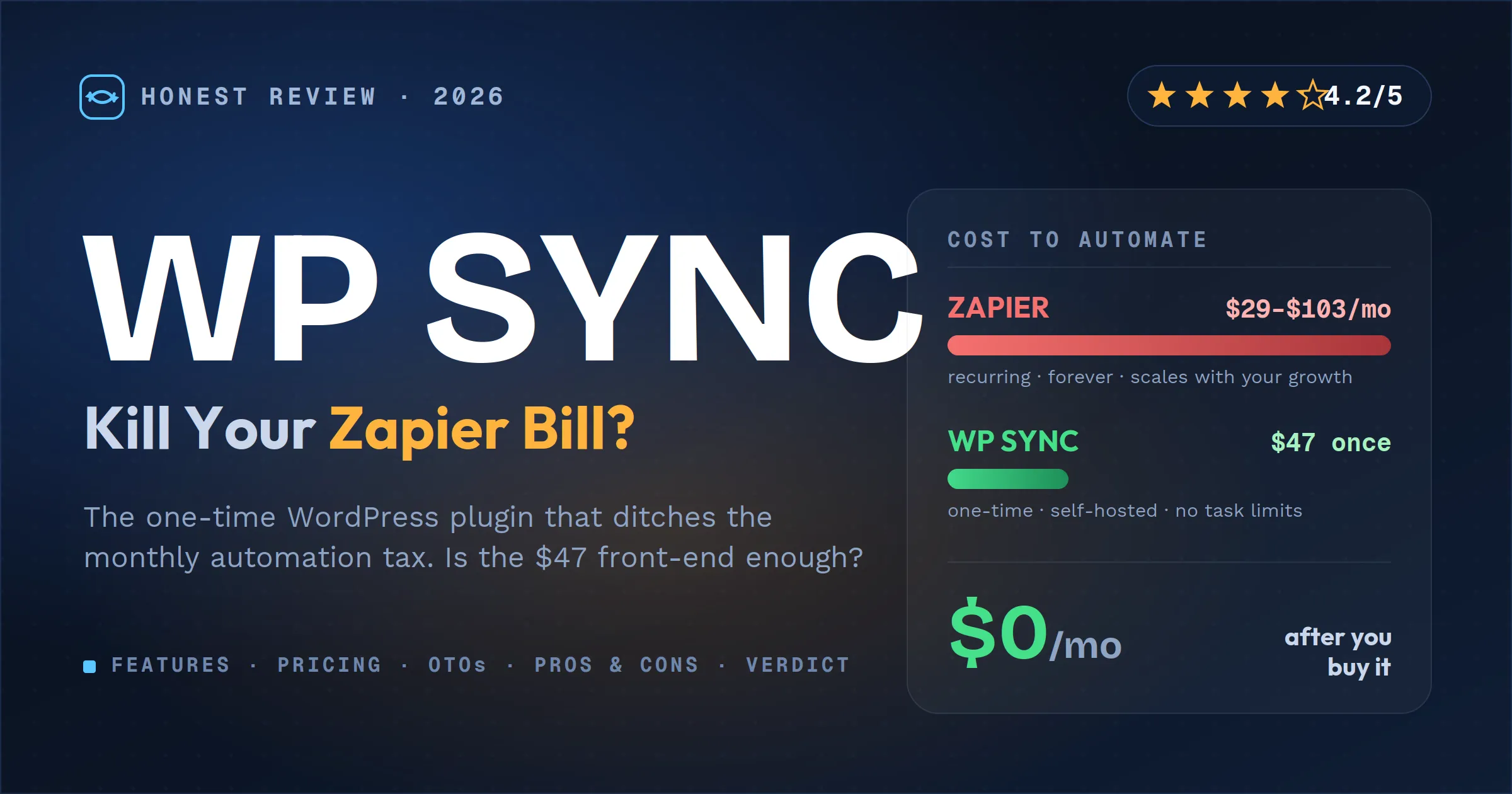
| Front-End Price | $47 one-time (Core tier) |
| Full Package | $147 one-time (all integrations) |
| Payment Model | One-time during launch, then moves to yearly billing |
| Guarantee | 30-day money-back |
| My Rating | 4.2 / 5 |
Bottom line: If you run a WordPress site and you’re bleeding money on Zapier, Make, or Pabbly just to shuttle your own leads between your own tools, WP Sync is a genuinely smart way to stop the bleeding. You own it, it runs on your server, and there’s no task meter counting down. It’s not a magic Zapier clone — it polls external sources on a cycle rather than firing instantly, it leans on your hosting to stay reliable, and the $47 tier is thinner than the sales page makes it sound. But for the right person, it pays for itself in a month or two. Recommended, with eyes open.
The Problem It’s Actually Solving
Let me be straight with you about why this product exists, because the pain is real.
Automation tools like Zapier charge you per task. Every time a lead moves from your Facebook ad to your email list, that’s a task. Every buyer synced to your CRM, another task. And here’s the part that stings: the better your business does, the bigger your bill gets. Your success is literally their upsell.
The current numbers back this up. As of 2026, Zapier’s Professional plan runs about $29.99/month for 750 tasks, climbing to $49/month for 2,000 tasks, and the Team plan sits at $69–$103.50/month. Make and Pabbly are cheaper, but they’re still meters — and most people underestimate their task burn by 3–5x, because one “Zap” often eats several tasks per run.
So yeah, the “automation tax” the sales page complains about is a real thing. Over a few years, moving your own data between tools you already own can quietly cost you thousands. That’s a legitimate problem, and it’s the whole reason WP Sync gets a fair hearing from me instead of an eye-roll.
What Is WP Sync?
WP Sync is a WordPress plugin that runs automation directly on your own site instead of on a rented cloud platform. Think of it as a self-hosted, pay-once alternative to Zapier that lives inside your WP dashboard.
You install it, connect your tools with API keys, and build what it calls “Bridges” — a source and a destination. New WooCommerce order → add buyer to ActiveCampaign. Facebook Lead Ad → subscribe to your list + log in Google Sheets. Calendly booking → ping Slack. Pick a trigger, pick an action, map your fields, done.
The key difference from Zapier isn’t the interface — it’s the ownership model. Your customer data never sits on a third party’s server, there’s no task meter, and when you stop paying (which, during launch, is never — it’s one payment), your automations don’t get switched off. It’s created by Kevin Fahey, an Irish marketer with a long track record on WarriorPlus and JVZoo and a reputation for tools people actually keep using. That track record matters a lot for a “lifetime” product, and I’ll come back to why.
How It Actually Works (and the one nuance nobody mentions)
Setup is genuinely simple — reviewers running it on a clean WordPress install with PHP 8+ report it takes minutes, not hours: upload the plugin, activate the license, connect a service with an API key, build a bridge, done.
But here’s the nuance that matters and that the hype emails gloss over: WP Sync isn’t fully real-time for external sources. It runs on a polling cycle — roughly every 5 minutes it checks your connected apps for new activity via WordPress cron. On-site WordPress triggers (a WooCommerce order, a form submit) can fire quickly because they’re native hooks, but anything it has to poll for lands on that ~5-minute cadence.
Is that a dealbreaker? For most marketers, no. A welcome email that goes out 5 minutes after opt-in instead of 5 seconds is fine. And for perspective, Zapier’s own free and starter tiers poll every 15 minutes — so WP Sync is actually faster than the cheap end of the tool it’s replacing. But if you need genuine instant, webhook-speed automation for time-critical stuff, know that going in.
Key Features & Benefits
Here’s what you’re actually getting, framed around what it does for you rather than the spec sheet.
- Unlimited automations, zero task meter — Build as many bridges as you want and run 10 leads a day or 10,000; the price never moves. This is the headline benefit and it’s real. No overage panic, no “you hit your limit” emails.
- The Bridge builder — A visual source-to-destination setup that a non-coder can follow. If you can paste an API key, you can wire up your lead flow.
- Smart tagging & field mapping — It doesn’t just dump an email address onto a list. It carries first name, last name, tags, custom fields, and product info, so you can actually segment and personalize instead of blasting everyone the same thing.
- Scheduling & delays — Send instantly, delay by minutes/hours/days, or schedule an exact date. Collect webinar registrants all week and release them into a launch sequence Friday morning, no extra tool required. This one’s underrated.
- Activity logs — Every action is recorded (what fired, when, success or fail), so when something breaks you’re not guessing.
- Your data stays on your server — Nothing passes through a middleman’s cloud. For anyone dealing with EU customers or privacy rules, that’s a real compliance advantage, not just marketing fluff.
Honest Pros & Cons
No product is all upside. If I couldn’t find cons, I didn’t look hard enough — so here’s the balanced read.
Pros
- One-time payment instead of a forever-subscription — the core value proposition, and it’s legit.
- No task limits at all. Your wins stay your wins.
- Data ownership / privacy-friendly architecture.
- Solid, experienced vendor with a history of supporting his products.
- Genuinely easy setup for a WordPress user.
- Scheduling and field mapping are more capable than you’d expect at this price.
Cons (read these before you buy)
- The “147 apps” claim needs an asterisk. The published native integration list is around 26 connections, not 147. The gap is almost certainly the generic webhook/catch-all connector, which can technically reach a lot more — but “click-to-connect native integration” and “technically reachable via a webhook you configure yourself” are not the same thing. Count the specific tools you need before buying.
- The $47 tier is thinner than it sounds. Core ($47) is built around 8 autoresponder integrations. Forms, webhooks, Zoom, and Google Sheets are in the $97 tier, and you need the $147 “Entire Package” for all 26. If your goal is, say, capturing WooCommerce or affiliate-platform buyers, confirm which tier carries that exact connector — don’t assume the $47 does it all.
- It depends on your hosting. Because it runs on WordPress cron, reliability is tied to your host. On decent managed WordPress hosting, that’s fine (arguably more reliable than a cloud dependency). On cheap, overloaded shared hosting, WP cron can be flaky — and flaky cron means missed syncs.
- ~5-minute polling, not instant for external sources (covered above).
- “One payment forever” is only as good as ongoing updates. If an autoresponder changes its API, the integration has to be maintained or it breaks. Kevin Fahey’s track record makes this a low-ish risk, but understand what a “lifetime” software deal actually depends on.
- Overkill if you don’t already run multiple platforms. If your whole business is one email tool and a checkout, you may not have enough moving parts to justify it.
A Few Sales-Page Claims Worth a Pinch of Salt
Because trust is the whole game here, let me flag the marketing language so you’re not buying on a fantasy:
- The income/results numbers in the promo emails — “3X to 5X your commissions,” “$318 in commissions,” “10–20 hours a month back,” “leads contacted in 5 minutes convert 21x better” — are best-case marketing projections, not typical outcomes. The 21x stat comes from an old lead-response study and is heavily situational. WP Sync can help with follow-up speed; it can’t promise you a specific income.
- “Done in 90 seconds, runs forever” — the setup genuinely is quick, but “forever” assumes your host and the connected APIs keep cooperating. It’s a tool, not a set-and-forget money printer.
Flagging these isn’t me trashing the product — it’s me making sure the pros above are believable. The tool is good enough that it doesn’t need the hype.
Pricing & OTO Breakdown
Here’s what you’ll really spend, front-end and funnel, so nothing surprises you at checkout.
Front-End Options (one-time during launch):
- WP Sync Core — $47 → the 8 core autoresponder integrations. (This is the tier tied to the $47 launch price.)
- WP Sync Core + Pro — $97 → adds Forms Connect, Webhook Connect, Zoom, and Google Sheets.
- WP Sync Entire Package — $147 → unlocks all 26 integrations. For most serious marketers, this is the tier that actually delivers on the “replace Zapier” promise.
The Upsell Funnel (8 OTOs — you can skip all of them):
- OTO 1 – Reseller Rights (~$297): Sell WP Sync and keep up to 90% commissions while the vendor handles delivery, support, and refunds. Only worth it if reselling is your model.
- OTO 2 – Developer License (~$297–$497): Run WP Sync on up to 25 sites. This is the agency/freelancer play — one client project can pay for it.
- OTO 3–7 – WP Conversion Tracker ecosystem: Kevin’s separate tracking tool (revenue/link tracking, split testing, QR codes, analytics) plus its own Pro/Audience Vault/Reseller/Developer tiers. Useful if you run paid traffic; unrelated to WP Sync’s core job.
- OTO 8 – Results With Kevin AI: A full AI marketing suite (sales pages, email copy, lead magnets, funnels, coaching). A big offer bolted onto the funnel — evaluate it on its own merits, not as a WP Sync add-on.
Honest note: exact prices for OTOs 3–8 can vary during the launch — check them on the order page before you click. And remember: none of the OTOs are required. The front-end (ideally the $147 package if you want everything) works on its own.
Launch perk: During launch, every plan works on 3 sites (normally 1), and launch buyers get their one-time price grandfathered before WP Sync moves to yearly billing.
WP Sync vs Zapier: The Honest Comparison
| Factor | WP Sync | Zapier |
|---|---|---|
| Pricing | One-time (from $47, up to $147) | Subscription — ~$30–$103+/month |
| Task limits | None (unlimited) | Task-metered; overages at 1.25x |
| Where it runs | Your WordPress server | Zapier’s cloud |
| Data ownership | Stays on your site | Passes through their servers |
| Speed | ~5-min polling / instant on native WP triggers | Near-instant webhooks (paid tiers); 15-min polling on free/starter |
| Integrations | ~26 native + webhook reach | 9,000+ apps |
| Ease of use | Easy for WP users | Polished, beginner-friendly |
| Best for | WordPress businesses tired of monthly fees | Teams needing huge app coverage + instant triggers |
My read: Zapier still wins if you need thousands of obscure integrations, true webhook-speed automation, or multi-user team features. WP Sync wins on cost, ownership, and no-meter scaling — if the ~26 native integrations cover the tools you actually use. For a WordPress marketer running a normal stack (email + checkout + forms + a CRM), WP Sync can absolutely replace the Zapier line item. For a complex ops team, keep Zapier.
Who WP Sync Is For (and Who Should Skip It)
Buy it if you’re:
- A WordPress-based marketer, course creator, or WooCommerce store owner tired of the monthly Zapier/Make/Pabbly bill.
- Running a normal stack whose tools are on that 26-integration list.
- An agency or freelancer (grab the Developer License — 25 sites pays for itself fast).
- Privacy-conscious or serving EU customers and you want data staying on your own server.
Skip it (or wait) if you’re:
- Not on WordPress. This is a WP plugin, full stop.
- On cheap, overloaded shared hosting where WP cron is unreliable.
- Dependent on a niche app that isn’t in the native list (check first — don’t assume the webhook covers it cleanly).
- Someone who needs genuine instant, webhook-speed automation for time-critical workflows.
- Running such a simple setup that you don’t really have anything to automate yet.
🎁 My Exclusive Bonuses (When You Buy Through My Link)
The best bonuses fix a product’s actual gaps — not a random pile of PLR. So mine are built around the exact weak spots I flagged above. Buy WP Sync through my link, forward me your purchase receipt, and I’ll send these over within 24 hours:
- Bonus 1 — Zapier-to-WP-Sync Migration SOP: A step-by-step checklist for moving your existing Zaps across one at a time without breaking anything, so the switch takes an afternoon instead of a weekend.
- Bonus 2 — WP Cron Reliability Checklist: How to make sure your host runs cron properly so your syncs never silently miss. This directly solves the biggest con in this review.
- Bonus 3 — Done-For-You Bridge Recipe Pack: My most-used source→destination setups (lead ad → list, checkout → CRM, webinar → sequence) so you’re not staring at a blank builder on day one.
- Bonus 4 — Integration Gap Cheat-Sheet: A plain-English map of which tools connect natively vs. via webhook, so you know exactly what you’re getting before you build.
Final Verdict: Is WP Sync Worth It?
Here’s my honest call. WP Sync does the thing it promises: it takes automation off the monthly-rental treadmill and puts it on your own site for a one-time price. The vendor is legit, the setup is easy, and the no-task-meter model is a real advantage that gets better the more your business grows.
It’s not the flawless Zapier-killer the emails paint. The “147 apps” number is inflated, the $47 tier is more of an entry point than the full solution, and it leans on your hosting to stay dependable. But none of that is dishonest enough to scare me off — it’s the normal set of trade-offs for a self-hosted tool, and the price more than accounts for them.
If you’re on WordPress and already paying an automation subscription, this pays for itself in a month or two and then it’s pure savings. Just go in with the right tier (I’d lean toward the $147 package if you want to genuinely replace Zapier) and skip the OTOs you don’t need.
Rating: 4.2 / 5 — a genuinely good-value tool with real caveats, from a vendor who’ll actually support it.
👉 Get WP Sync at the one-time launch price + my bonuses — before it moves to yearly billing.
FAQ
Is WP Sync a one-time payment or a subscription? During the launch it’s a one-time payment (from $47), and launch buyers get that price grandfathered. After launch it moves to yearly billing for new customers.
Do I need the OTOs for WP Sync to work? No. The front-end works on its own. The upsells add reseller rights, a 25-site developer license, a separate tracking tool, and an AI suite — all optional. For most people the $147 full package is the sweet spot without any OTOs.
How is WP Sync different from Zapier? WP Sync runs on your own WordPress server for a one-time fee with no task limits, and your data never leaves your site. Zapier is a cloud subscription billed per task. Zapier has far more integrations and faster webhook triggers; WP Sync wins on cost and ownership.
Does WP Sync really connect 147 apps? The marketing says 147, but the published native integration list is around 26. The larger number appears to count apps reachable through the generic webhook connector. Check that the specific tools you use are natively supported before buying.
Is there a money-back guarantee? Yes — WP Sync comes with a 30-day money-back guarantee, so you can install it, build an automation, and request a refund within 30 days if it doesn’t fit your business.